Why Won't My Nintendo Switch Charge or Turn On in Columbus, Ohio?
A Nintendo Switch that won’t charge or turn on usually has a deeply drained battery, a damaged USB-C port, or a failed charging chip such as the M92T36 or BQ24193. Nintendo Switch repair in Columbus, Ohio starts with a free diagnostic and upfront quote, and console repairs include a 90-day warranty. Try a hard reset first, then visit our game console repair service or read whether console repair is worth it.
Why Won’t My Nintendo Switch Charge or Turn On in Columbus, Ohio?
A Nintendo Switch that won’t charge or turn on usually has a deeply drained battery, a damaged USB-C port, or a failed charging chip such as the M92T36 or BQ24193. Nintendo Switch repair in Columbus, Ohio starts with a free diagnostic and upfront quote, and console repairs include a 90-day warranty. Try a hard reset first, then visit our game console repair service or read whether console repair is worth it.
Why Won’t My Nintendo Switch Charge or Turn On?
A Nintendo Switch that won’t charge or turn on usually has one of four problems: a fully drained battery, a frozen system, a damaged USB-C charging port, or a failed charging chip on the motherboard. The first two are often fixable at home. The last two need a repair.
The Switch charges through a USB-C port, and power is managed by chips including the M92T36 power delivery IC and the BQ24193 charging IC. When one of these fails, the console may show no charging icon at all, even with the official charger.
It also helps to note what happened right before the problem started. A Switch that died after a drop, a spill, or a new third-party dock points toward a different cause than one that simply ran its battery down and sat in a drawer for months.
Quick Fixes to Try Before a Nintendo Switch Repair
Start with these checks, which solve a surprising number of no-power cases:
- Charge it longer: plug the Switch into the official Nintendo AC adapter and leave it for at least 30 minutes to an hour before trying to power on.
- Hard reset: hold the power button for about 12 to 15 seconds, release it, then press it once normally.
- Try the dock and the adapter separately: charge directly from the AC adapter, then through the dock, to see if one path works.
- Check the port: look for lint, bent pins, or a loose fit in the USB-C port with a flashlight.
If a battery icon appears on screen after a long charge, the battery was simply drained, and the console should start normally once it has some power.
If nothing changes after these steps, the problem is likely hardware.
Common Hardware Causes of Switch Power Problems
Most hardware causes come down to the charging path. These are the faults technicians see most often:
- Damaged USB-C port: frequent docking and handheld charging can loosen or bend the port.
- Failed M92T36 chip: this power delivery chip can fail, sometimes after using an unofficial charger or dock.
- Failed BQ24193 chip: this charging IC controls how the battery charges and can stop the console from charging.
- Worn battery: an aging battery may stop holding a charge, especially after being left fully drained for months.
- Liquid damage: spills can corrode the board around the port and charging circuitry.
Joy-Con charging is a separate system. If the console charges but the Joy-Cons do not, the issue is usually the rail connector on the side of the console, not the main charging circuit.
Nintendo Switch Repair in Columbus, Ohio
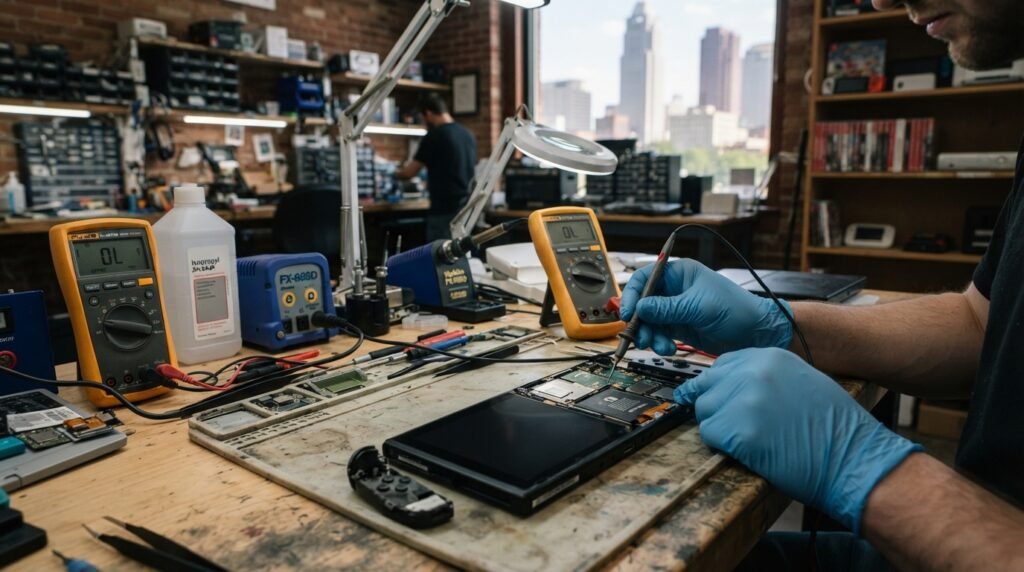
Nintendo Switch repair in Columbus, Ohio begins with testing the charging circuit to find which part failed. A technician measures whether the console draws power, checks the USB-C port, and inspects the charging chips under magnification.
Port and chip replacements are board-level work that takes micro-soldering experience. If your Switch also has HDMI trouble in the dock, the same ideas in our guide to HDMI port vs. HDMI chip failures apply. Learn more about the consoles we fix on our game console repair page.
Because the fix depends on the exact fault, there is no single price for a Switch that won’t charge. A free diagnostic narrows it down and gives you an upfront quote before any work begins, and our guide to whether console repair is worth it helps you weigh that quote.
How to Prevent Nintendo Switch Charging Problems
The best prevention is to use the official Nintendo charger or a reputable, well-reviewed USB-C power supply. Low-quality docks and chargers have long been linked to charging chip failures.
Avoid storing the console fully drained for long periods, insert the console into the dock gently, and keep the USB-C port free of lint. The same port habits help phones too, as covered in our post on why a phone stops charging.
If the console gets wet, power it off immediately and do not charge it. The steps in our water damage first 24 hours guide apply to handheld consoles as well as phones.
Bring Your Switch to Our Clintonville Repair Shop
If your Nintendo Switch still won’t charge or turn on, bring it to our Clintonville shop at 4971 N High St, Columbus, OH 43214. Walk-ins are welcome daily from 9:00 AM to 5:00 PM, and every Switch gets a free diagnostic and upfront quote.
Many Switch repairs are finished the same day, depending on the issue and part availability, and console repairs carry a 90-day warranty. Call (614) 325-5843, contact us online, or see what local gamers say on our customer reviews page.
Frequently Asked Questions
Why is my Nintendo Switch not charging when plugged in?
A Nintendo Switch that isn’t charging when plugged in usually has a drained battery, a faulty charger, a damaged USB-C port, or a failed charging chip. Start by using the official Nintendo AC adapter and leaving the console plugged in for at least 30 minutes. If the charging icon never appears, the M92T36 or BQ24193 chip may have failed, which requires board-level repair by a technician. Mention any recent drops or new accessories during your visit.
How do I force restart a Nintendo Switch that won't turn on?
To force restart a Nintendo Switch, hold the power button for about 12 to 15 seconds, release it, and then press it once normally. This clears a frozen system that only looks dead. For best results, connect the console to the official charger before trying. If the screen still stays black after a hard reset and a long charge, the problem is likely hardware related. A technician can then test the battery and charging circuit to find the cause.
What is the M92T36 chip on a Nintendo Switch?
The M92T36 is a power delivery chip on the Nintendo Switch motherboard that manages USB-C power negotiation with chargers and the dock. When it fails, the console may not charge, may not work in the dock, or may not turn on at all. Failures have often been linked to unofficial docks and chargers. Replacing the chip requires micro-soldering and proper testing equipment. If your Switch stopped charging right after a new dock, this chip is a common suspect.
Can a dead Nintendo Switch battery be revived?
Yes, a deeply drained Nintendo Switch battery can often be revived by charging it with the official adapter for at least an hour before powering on. Batteries left empty for months may drop below the level the console will start from. If the battery still won’t hold a charge after a long charge and hard reset, a battery replacement or charging circuit diagnosis is the next step. Leaving the console partly charged during storage helps prevent this.
Can a third-party charger damage a Nintendo Switch?
Yes, some low-quality third-party chargers and docks can damage a Nintendo Switch. Poorly designed accessories may not follow USB-C power standards correctly, which can stress or burn out charging components like the M92T36 chip. The safest choice is the official Nintendo AC adapter or a reputable, well-reviewed USB-C power supply. If a Switch stopped charging right after a new accessory, mention that during diagnosis. Look for accessories that clearly list USB-C Power Delivery support and solid reviews.
How much does Nintendo Switch repair cost in Columbus, Ohio?
Nintendo Switch repair cost in Columbus, Ohio depends on the part that failed and the labor involved. A port replacement, a charging chip replacement, and a battery replacement are all priced differently, and liquid damage can add time. Prices are not one-size-fits-all, so the best approach is a free diagnostic followed by an upfront quote before any work begins. That way you know the exact cost first. Many Switch repairs are also finished the same day, depending on the issue and parts.
Is it worth repairing a Nintendo Switch that won't turn on?
Yes, repairing a Nintendo Switch that won’t turn on is usually worth it. Most causes are a single failed part, such as a USB-C port, a charging chip, or a worn battery, and those repairs typically cost less than a new console. Repair also keeps your user profile and setup in place. A free diagnostic confirms the cause so you can compare the quote with replacement. Console repairs at the Clintonville shop also include a 90-day warranty.
Does the Nintendo Switch Lite have the same charging problems?
Yes, the Nintendo Switch Lite can have similar charging problems because it also charges through USB-C and uses comparable charging circuitry. A drained battery, damaged port, or failed charging chip can all stop it from powering on. The Lite does not dock to a TV, so dock-related problems are less common. The same quick checks and diagnostic steps apply to the Lite, the original Switch, and the OLED model. Each model starts with the same free diagnostic.
How long does a Nintendo Switch charging repair take?
Many Nintendo Switch charging repairs are completed the same day, depending on the issue and part availability. A USB-C port or battery replacement is often faster than a board-level chip repair, which needs careful micro-soldering and testing. Liquid damage can take longer because the board may need cleaning. Calling ahead to confirm parts is optional, and walk-ins are welcome daily from 9:00 AM to 5:00 PM. Every console repair also includes a 90-day warranty.